
PhotoRecon
The iOS field app for photographers who work on location. Plan assignments. Scout locations with AI. Visualize light on a map. Import itineraries. Track shots. Generate pitches. Deliver the work.
Download on the App StoreWhy PhotoRecon Exists
Nearly two decades in the field. One app.
PhotoRecon was built by Ben Weller, a Japan-based photojournalist whose work has appeared in National Geographic, The Wall Street Journal, Bloomberg Markets, Reuters, and Virtuoso. After nearly two decades shooting assignments across Asia, from travel features in remote prefectures to industrial commissions inside working factories, the planning side of the job had only become more complex: too many apps, too many open tabs, too much time lost to logistics.
The idea for PhotoRecon came while planning a six-day travel editorial assignment through Western Japan. Itinerary in a spreadsheet. Locations in Google Maps. Notes in one app, sunrise times in another, hotel confirmations piling up in his email inbox. Somewhere around the third hour of planning, the thought landed: there should be one tool that does all of this.
So he built one. Not as a developer, but as a photographer solving a problem. Then he kept building until what started as a tool became a system designed to reduce planning overhead, tighten logistics, and create more room for attention, judgment, and creativity. Every feature in PhotoRecon exists because it solved a real problem on a real assignment, and every feature has survived testing in the field.
Built for How You Actually Work
Brief to delivery, in your pocket.
Assignment Planning
Start with the brief. Build the day from there.
Assignments built around real working needs.
PhotoRecon starts where most jobs actually start: the brief, the schedule, the locations, and the pressure to get organized fast. Build assignments around clients, dates, briefs, and stops, then connect everything else to that structure.
Once the assignment is in place, locations, shot lists, field notes, expenses, and delivery records all stay tied to the same job instead of scattered across different apps.
- Store the brief, client, dates, and notes in one place
- Keep locations tied to the actual assignment
- Build the rest of the workflow from a real job structure
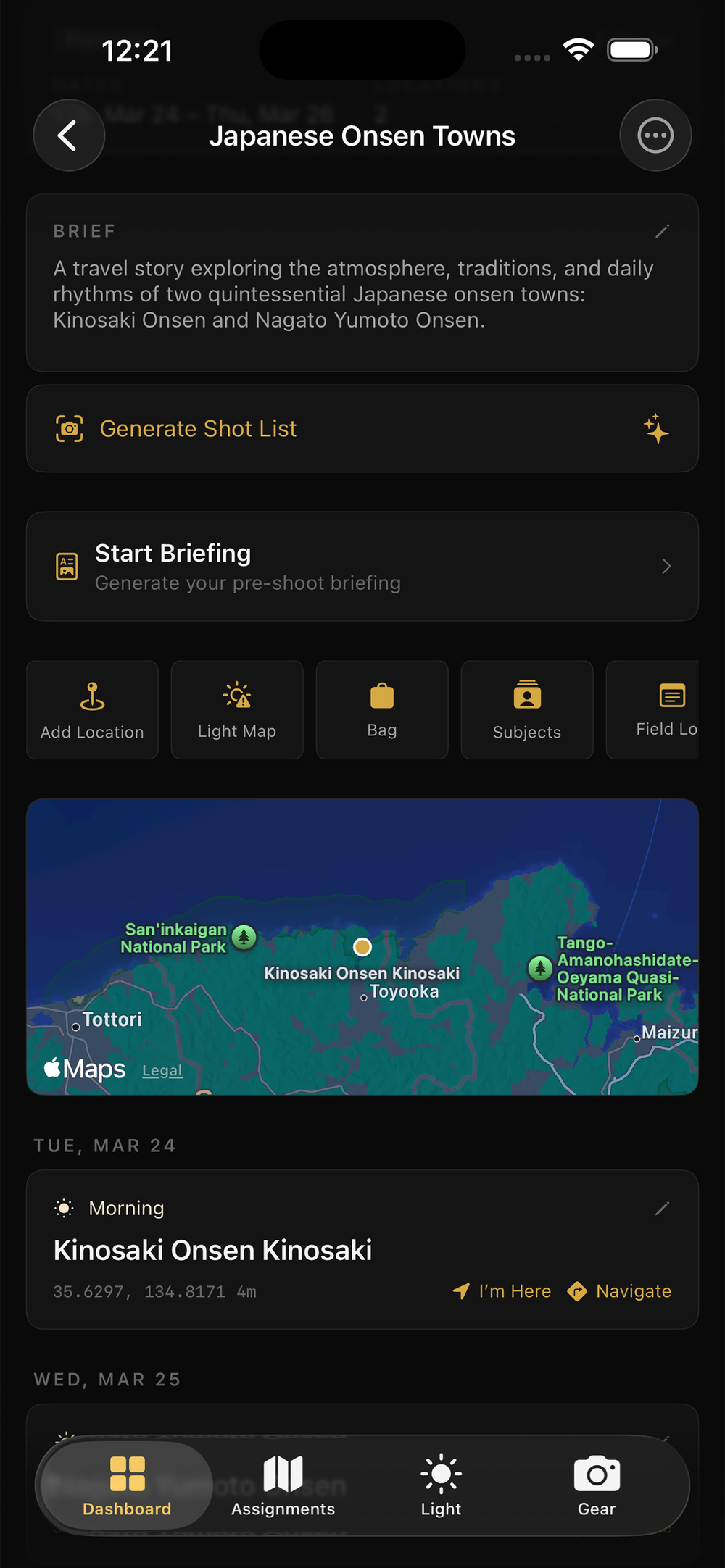
Assignments anchor the rest of the workflow
Core Features
Reduce the overhead. Keep your mind on the work.
PhotoRecon is a workflow app for photographers shooting on location. Most core features work without AI. AI features require your own Anthropic API key. Usage costs are minimal and billed directly by Anthropic. Weather features use a free OpenWeather API key.
Assignment Planning
Create assignments with clients, dates, briefs, and locations. Import itineraries from CSV files. Organize multi-day shoots with time slots. Track status from planning through delivery.
Import uses AIField Assistant
AI co-pilot that sees your workspace. Add expenses, generate shot lists, update plans, and get practical guidance through natural conversation. It can work with your data, not just comment on it.
AI-poweredScout Location
Research any location from your phone. Build context around a place before you arrive. With AI enabled, generate location intel, cultural notes, practical observations, and editorial angles worth pursuing.
AI-poweredLight & Weather
Golden hour, blue hour, sunrise, sunset, and sun position for any location and date worldwide. Live weather conditions and forecast — cloud cover, wind, humidity, visibility. Astronomical calculations work offline; weather uses a free OpenWeather API key.
Weather requires free API keyLight Map
See all your locations on a map with a time scrubber. Pins change color based on light quality — gold for golden hour, blue for blue hour, red for harsh midday. Find the best light at any location at any time.
No API neededShot Tracking
AI generates shot lists from your client brief, or add shots manually. Check them off as you shoot. Progress bars show completion per location. Never miss a mandatory shot.
AI generation optionalStory Pitches
Turn location research into editorial story pitches. Generate multiple angles, refine them, and track each pitch from draft through acceptance.
AI-poweredSubjects & Interviews
Create contact cards for every subject you photograph. Attach them to assignments. Record interviews directly in the app — audio stays linked to the subject, not buried in your voice memos.
No API neededGear & Packing
Full gear inventory with weight, value, insurance, and condition tracking. Build assignment-specific packing lists. Know exactly what’s in your bag for every job.
No API neededExpense Tracking
Log expenses in seconds. Auto-categorizes from keywords. Multi-currency support (JPY, USD, EUR, GBP). Associates with assignments for invoicing.
No API neededDelivery & Export
Log deliveries with file counts, usage rights, and delivery method. Export professional delivery memos as PDF. Export itineraries, field logs, and expense reports.
No API neededField Log
Quick-capture notes from the field. Auto-tags your GPS location. Log observations, ideas, and session notes. Filter by assignment. Export as PDF.
No API neededFlagship Feature
Field Assistant — your AI co-pilot in the field.
Talk to your data.
Field Assistant is an AI advisor that sees your entire workspace — assignments, locations, gear, briefs, shot lists, expenses, and schedules. Ask it questions in plain language. It doesn’t just answer — it takes action.
Say “add a ¥3,200 taxi expense to the Osaka assignment” and it’s done. Ask “what should I be watching for shooting surfers around Kamakura today?” and it responds like a knowledgeable peer, using the location, weather, light, and your project context. Ask it to generate a shot list from a client brief and it gives you something you can edit and track.
- Reads assignments, gear, locations, and briefs for context
- Adds expenses, updates planning data, and generates shot lists through conversation
- Uses Claude Haiku for fast commands, Claude Sonnet for analysis
- Works from a floating button accessible on every screen
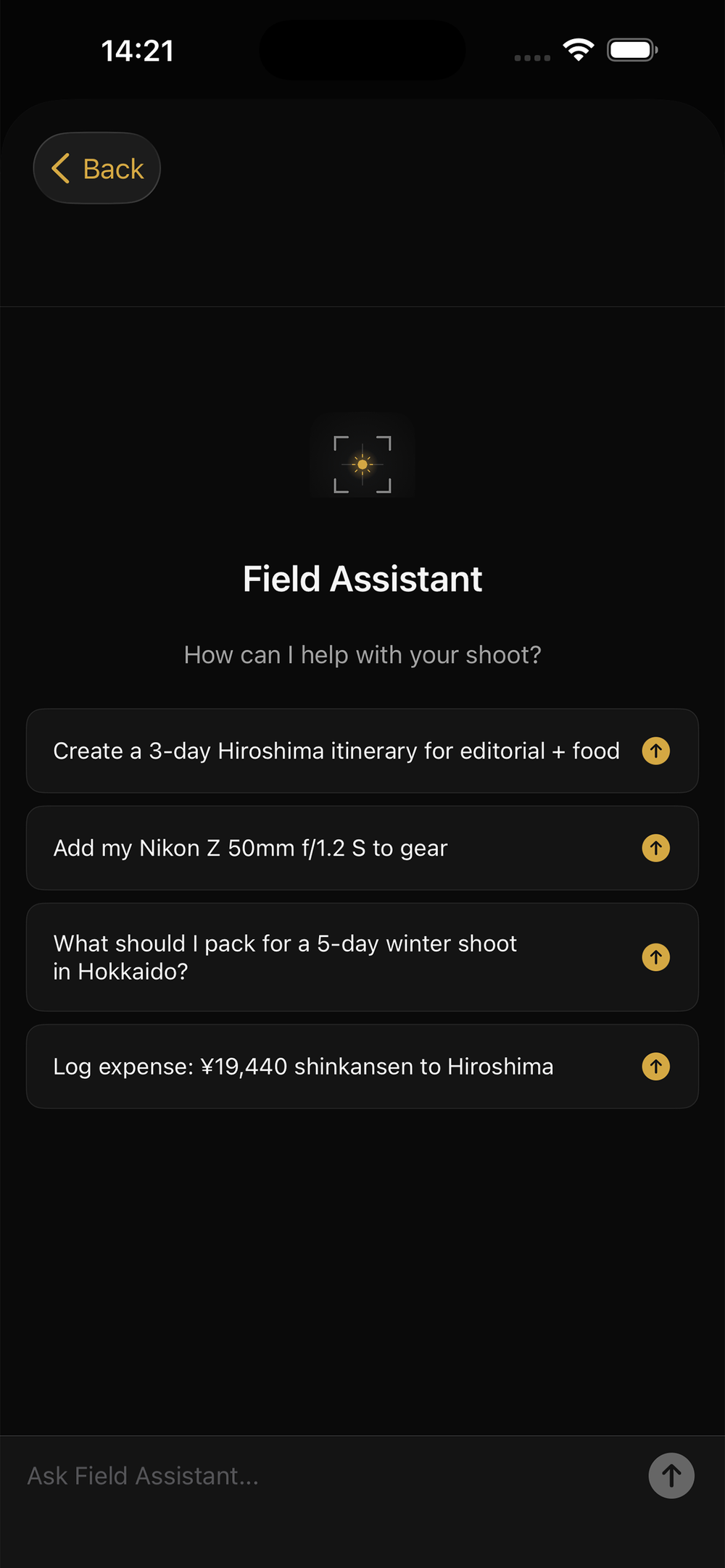
Accessible from every screen via the floating gold button
Flagship Feature
Light Map — see the light before you get there.
Every location. Every hour. One map.
Light Map plots all your assignment locations on a map and lets you scrub through time with a slider. As the time changes, each pin changes color based on light quality at that exact moment for that exact position. Gold for golden hour. Blue for blue hour. Red for harsh midday. Gray for darkness.
Small arrows on each pin show sun direction (azimuth), so you know where the light is coming from before you arrive. Tap any pin for the full breakdown — elevation, azimuth, and light quality name.
- Time slider scrubs from 4 AM to 9 PM in 15-minute steps
- Pins color-coded: golden hour, blue hour, good light, harsh, dark
- Sun direction arrows on every pin show azimuth
- Change date to plan future shoots
- Computed entirely on-device — works offline, anywhere in the world
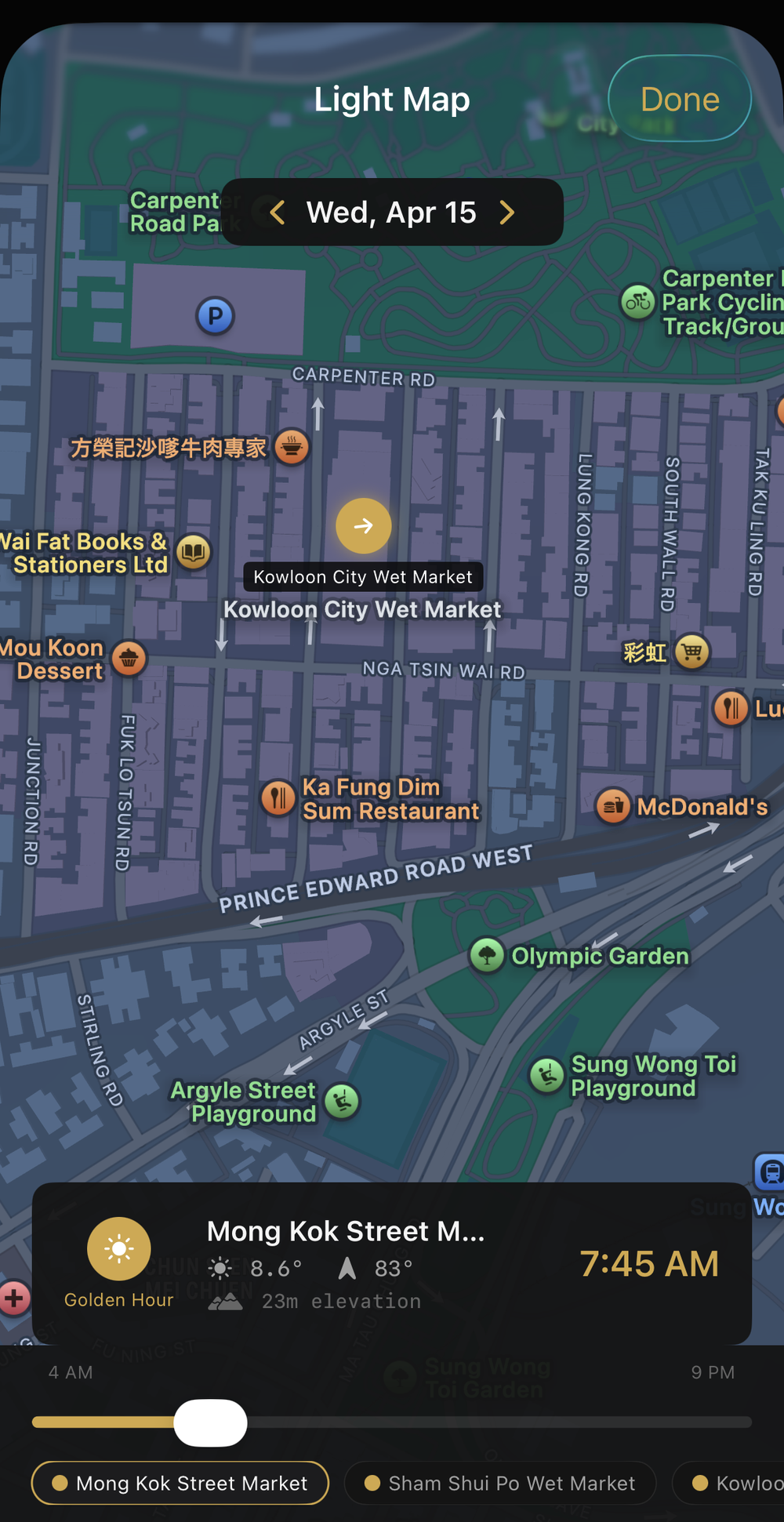
Scrub through the day and watch the light change across every location
Flagship Feature
Import itineraries from CSV files.
Your production schedule, on a map in seconds.
Assignment photographers frequently receive itineraries from editors, producers, fixers, or clients in formats that are useful for planning but awkward in the field. PhotoRecon helps turn those into a working assignment.
Import a CSV file and AI extracts the locations, dates, time slots, and notes, then builds a structured itinerary you can immediately work from inside the app.
- Import from CSV files
- AI extracts locations, dates, time slots, and notes
- Locations automatically populate on the assignment map
- Add shot lists, coordinates, and field notes to each location
- Useful for producer schedules, fixer itineraries, and client briefs
Import a CSV itinerary and turn it into a usable assignment
Scout Location + Pitches
Research locations. Build story ideas. Develop pitches worth sending.
Scout Location and Pitches work together. One helps you understand a place. The other helps you turn that understanding into editorial possibilities you can actually pursue.
Scout Location
Tap Scout Location on the Dashboard. Use your current GPS position or search for any location worldwide. With an Anthropic API key, PhotoRecon generates AI-powered location intel built to help photographers think more clearly about a place before they commit time, travel, or attention to it.
Scout Location can generate context around a place, practical cultural notes, and less obvious editorial directions worth considering before you pitch or assign the job to yourself.
- What Is This Place — history, character, and why the place matters
- Cultural Notes — customs, access considerations, and practical observations
- Unexpected Angle — a less obvious editorial or visual direction worth considering
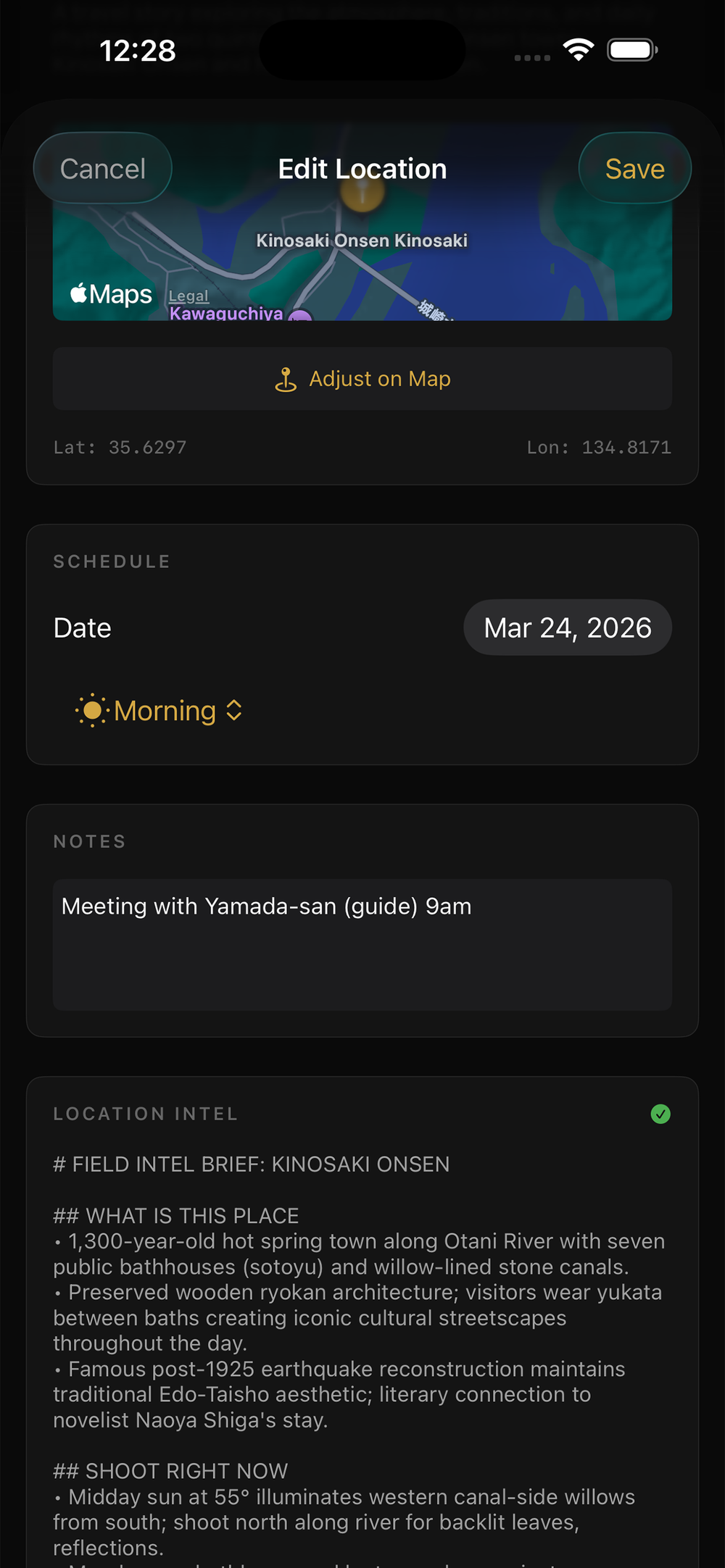
Location research designed for field photographers
Story Pitches
This is where PhotoRecon goes beyond planning.
Generate story pitches from saved location intel. PhotoRecon creates multiple editorial angles, each with a working title, a short hook, and a suggested publication fit. Alternatively, you can build your own assignment, shoot it, and PhotoRecon will generate pitches based on the locations you shot, your field notes, and your target publications.
- Generate multiple editorial angles from saved intel
- Refine promising ideas before pitching
- Track each pitch through draft, pitched, accepted, or passed
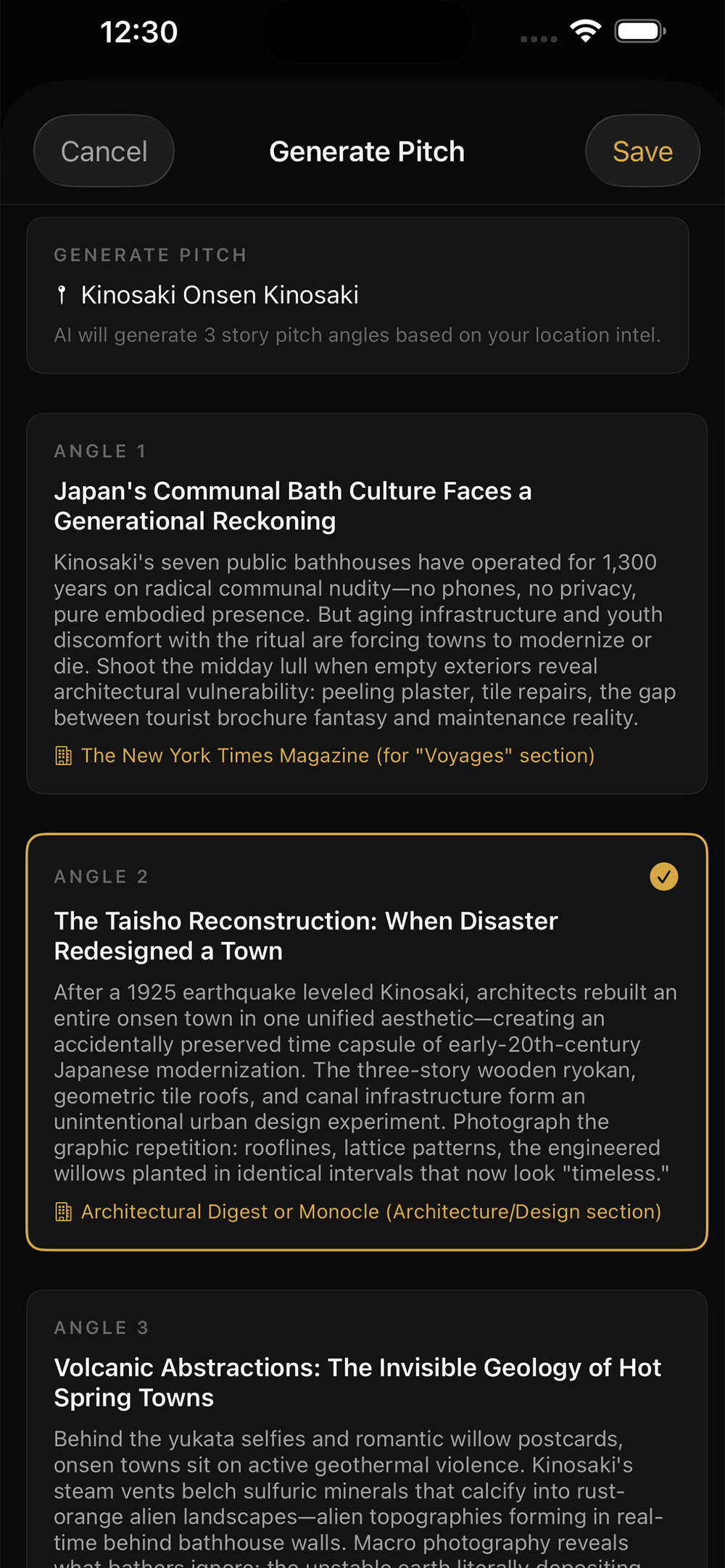
Turn location research into pitchable editorial ideas
Privacy-First Architecture
Your data stays on your device. Period.
PhotoRecon has no server, no cloud sync, no account system, no analytics, and no tracking. All your data is stored locally as files on your phone. It never leaves your device unless you explicitly use an AI feature or export a backup.
Local Storage Only
All data stored on-device as local files. No server. No cloud.
Your Own API Keys
Stored in iOS Keychain with hardware encryption. Never synced or backed up.
No Tracking
No analytics SDKs, no crash reporting, no device identifiers, no ads.
AI You Control
AI features are optional and can be disabled anytime in Settings.
AI & Setup
Simple to own. Simple to control.
PhotoRecon is currently free to download. Core features work without subscriptions or accounts. AI features require your own Anthropic API key. Usage costs are minimal and billed directly by Anthropic. Weather features use a free OpenWeather API key.
That setup keeps costs transparent and keeps control in your hands.
Built for the Field
Built for photographers who work on location.
Editorial, documentary, travel, commercial, industrial — if you receive briefs, plan shoots, manage logistics, and deliver files on deadline, PhotoRecon was designed for how you actually work. It doesn’t matter whether you’re shooting a travel feature in rural Japan or a corporate commission in Singapore. If the job takes you somewhere, PhotoRecon reduces the planning burden so you can focus on the work.
Editorial & Documentary
Scout locations, develop story angles, track shot lists against the brief, and manage multi-day assignments across multiple stops.
Travel & Location Photography
Import itineraries, plan around changing light, and work more efficiently in unfamiliar places.
Commercial & Client Work
Organize briefs, clients, logistics, shot lists, expenses, and delivery notes in one place.
Under the Hood
Technical details for the curious.
- Platform: iOS 17+ (iPhone). Built with SwiftUI.
- Data: Local file persistence with export/import backup support.
- Light calculations: Astronomical sun position computed on-device using standard solar equations. Accurate for any coordinates and any date.
- AI: Anthropic Claude API (Haiku for simple commands, Sonnet for analysis and generation). BYOK model — your key, your usage, your control.
- Weather: OpenWeather API — current conditions and 5-day forecast. Free tier is sufficient.
- Maps: Apple MapKit and CoreLocation. Location search via MKLocalSearch.
- Security: API keys stored in iOS Keychain (hardware-backed encryption). All API calls over HTTPS. No data collection.
- Offline: Core features fully functional without internet. Graceful degradation for network-dependent features.
Less time on logistics. More time making pictures.
No subscriptions. No account required. Just the tools a working photographer actually needs.
Download on the App StoreSupport
PhotoRecon Support
Questions, bug reports, or feature requests? Reach out at support@wellerpix.com.